QuickBooks Online Accountant Work. Woody Adams and I have teamed up to bring you the QBO TOP 40 COUNTDOWN (to #QBConnect)
We’ve compiled a list of 40 features, tips and tricks that will help you work better, faster smarter. Keep in mind, there’s no particular order here we both just added to the list until we hit 40!
Adding an expense with QBO Mobile App. Woody Adams and I have teamed up to bring you the QBO TOP 40 COUNTDOWN (to #QBConnect)
We’ve compiled a list of 40 features, tips and tricks that will help you work better, faster smarter. Keep in mind, there’s no particular order here we both just added to the list until we hit 40!
Adding an expense with QBO Mobile App
Short video on adding an expense with a receipt picture, using the QuickBooks Online mobile app:
Using QuickBooks Online Drawers. Woody Adams and I have teamed up to bring you the QBO TOP 40 COUNTDOWN (to #QBConnect)
We’ve compiled a list of 40 features, tips and tricks that will help you work better, faster smarter. Keep in mind, there’s no particular order here we both just added to the list until we hit 40!
Using QuickBooks Online Drawers
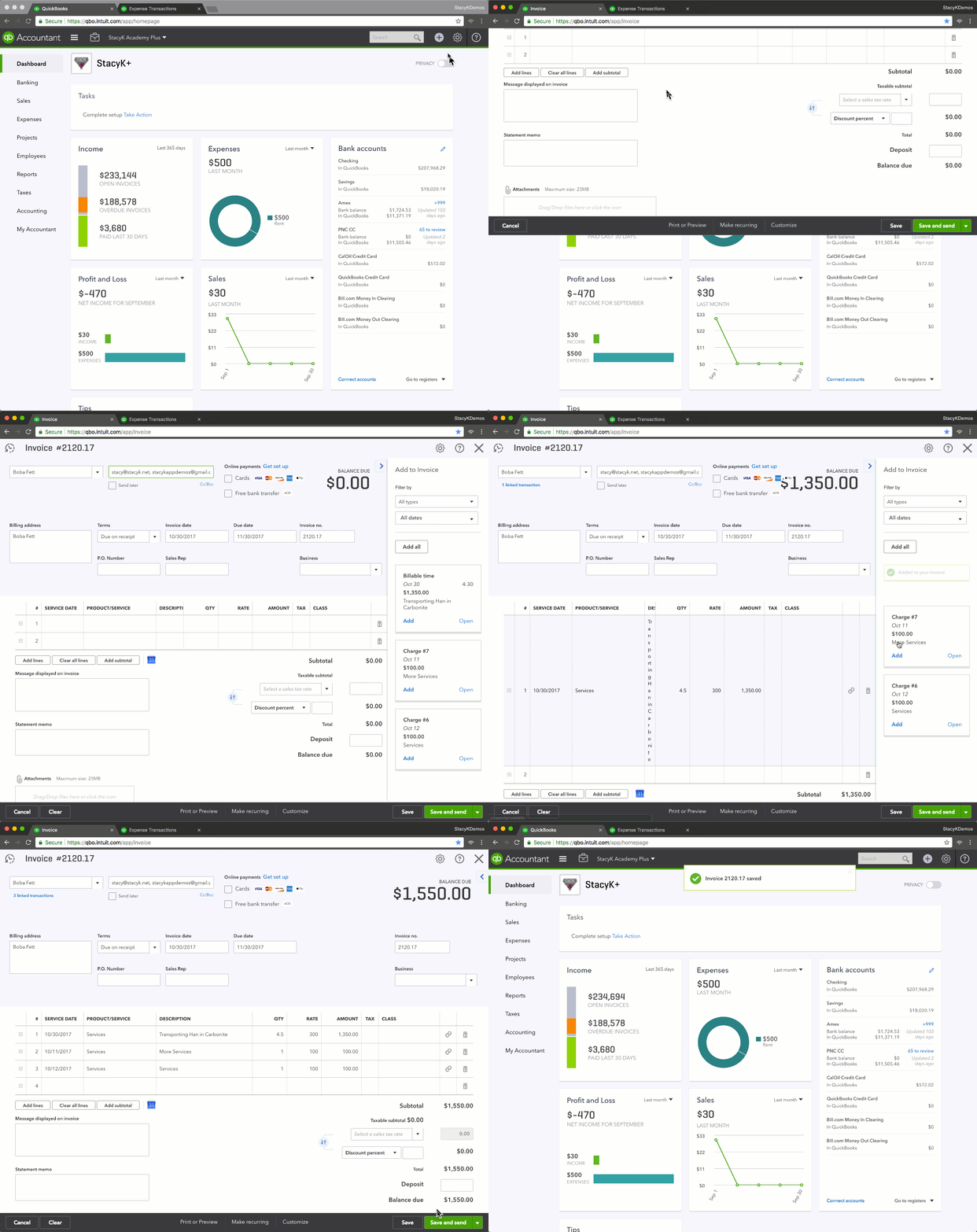
When you have estimates, billable time, expenses or delayed charges assigned to a customer in QuickBooks Online, you’ll be prompted to add those to an invoice when you choose that customer name:
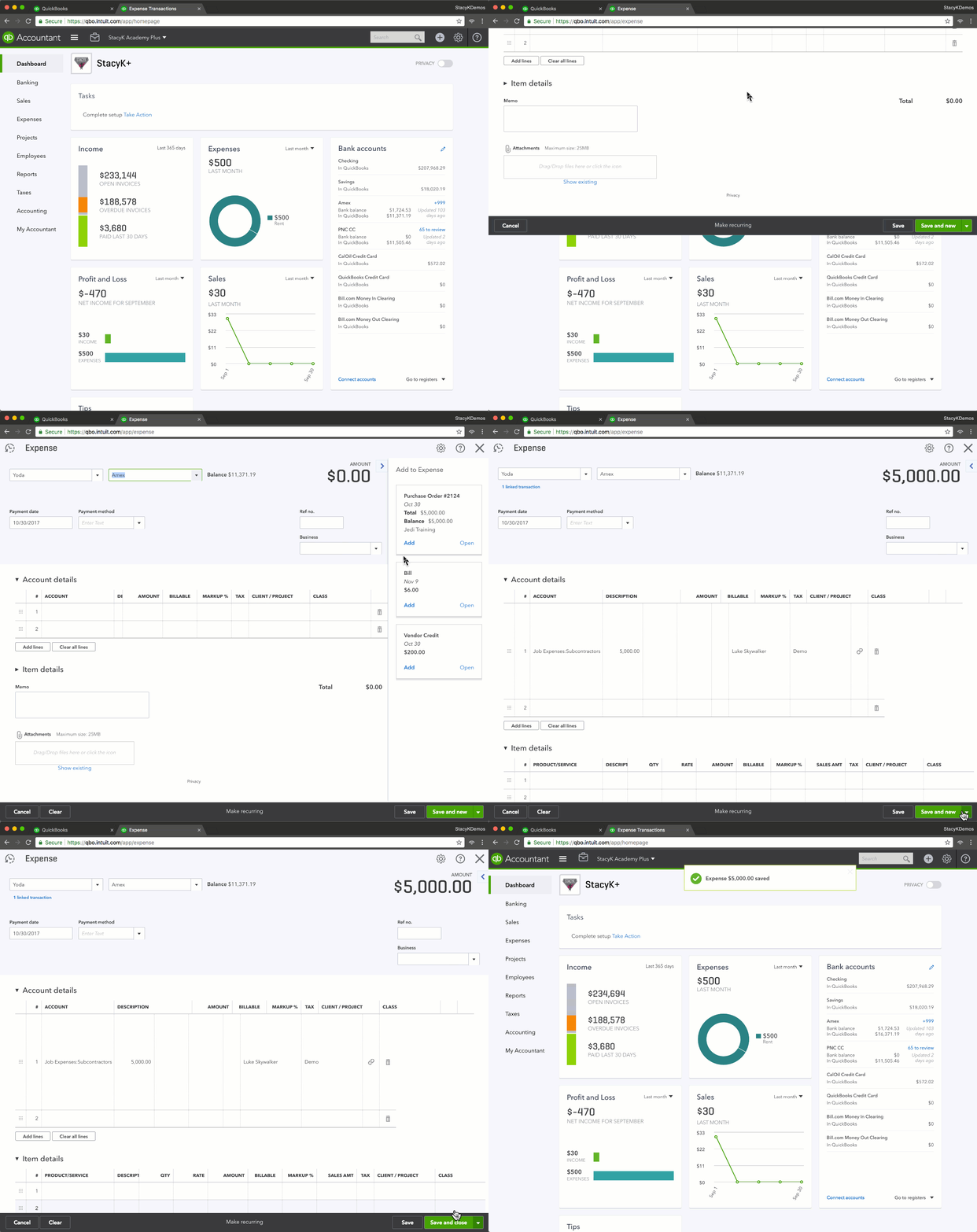
On the vendor side, if you have purchase orders or open bills, vendor credits, the drawer will open as well, so that you may add them:
Converting from QuickBooks for Mac to QuickBooks Online. Woody Adams and I have teamed up to bring you the QBO TOP 40 COUNTDOWN (to #QBConnect)
We’ve compiled a list of 40 features, tips and tricks that will help you work better, faster smarter. Keep in mind, there’s no particular order here we both just added to the list until we hit 40!
Converting from QuickBooks for Mac to QuickBooks Online
No audio in this video; it’s just a short tutorial on how to convert your QuickBooks for Mac 2016 file to QuickBooks Online:
QuickBooks Online Multi-currency. Woody Adams and I have teamed up to bring you the QBO TOP 40 COUNTDOWN (to #QBConnect)
We’ve compiled a list of 40 features, tips and tricks that will help you work better, faster smarter. Keep in mind, there’s no particular order here we both just added to the list until we hit 40!
Converting from QuickBooks Enterprise Solutions to QuickBooks Online. Woody Adams and I have teamed up to bring you the QBO TOP 40 COUNTDOWN (to #QBConnect)
We’ve compiled a list of 40 features, tips and tricks that will help you work better, faster smarter. Keep in mind, there’s no particular order here we both just added to the list until we hit 40!
Converting from QuickBooks Enterprise Solutions to QuickBooks Online
Woody has a video that details how to convert from QuickBooks Enterprise solutions to QuickBooks Online.
Open the QBES file, then click the F2 button to bring up the Product Information page, then click CTRL B + CTRL Q. Then just close the Product Information page and follow the conversion wizard.