Woody Adams and I have teamed up to bring you the QBO TOP 40 COUNTDOWN (to #QBConnect)
Bill.com QuickBooks Online Bill Pay: We’ve compiled a list of 40 features, tips and tricks that will help you work better, faster smarter. Keep in mind, there’s no particular order here we both just added to the list until we hit 40!
Bill.com QuickBooks Online Bill Pay
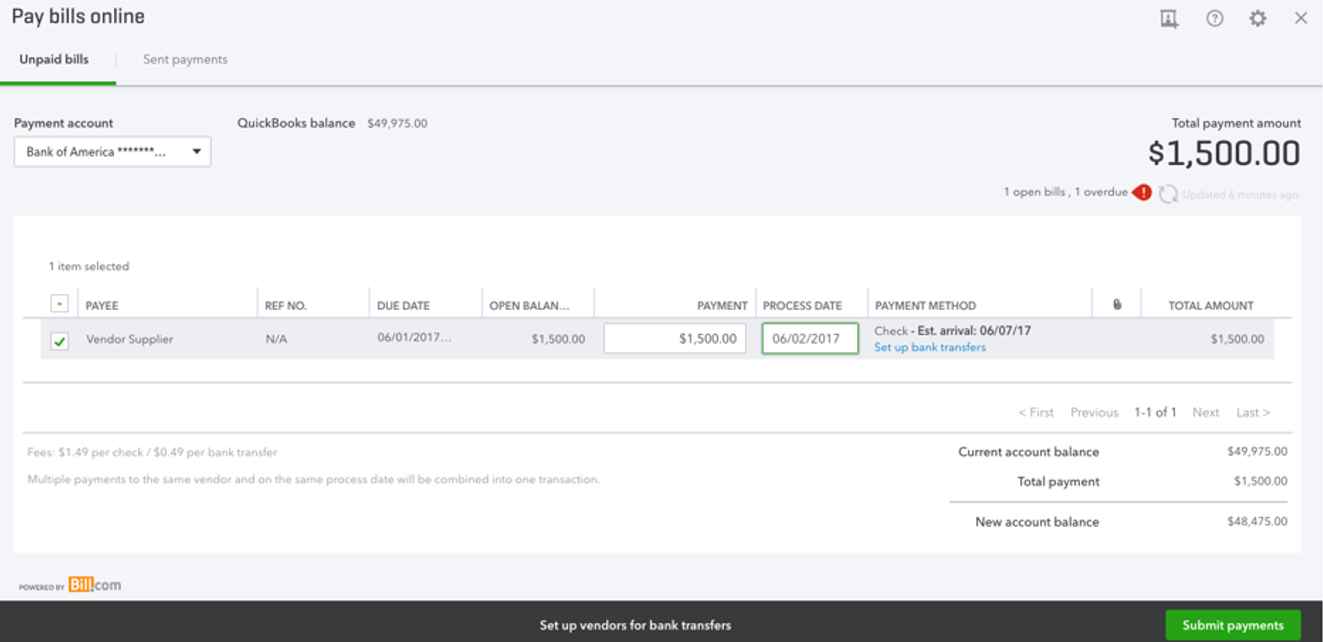
Now there is a way to do Vendor ACH leveraging bill.com, but built inside of QBO. If you do not see the below access point to sign up for the Online Billpay feature (powered by bill.com) in your QBO file, support can give you a URL to force the sign up process…It is just paying vendors online, $9.99/mo and $.49/electronic payment, $1.49/mailed check.
Woody Adams and I have teamed up to bring you the QBO TOP 40 COUNTDOWN (to #QBConnect)
QuickBooks Payments: We’ve compiled a list of 40 features, tips and tricks that will help you work better, faster smarter. Keep in mind, there’s no particular order here we both just added to the list until we hit 40!
QuickBooks Payments
Woody and I did a video in 2015 about how QB Payments works – showing the process end to end process. The basic process hasn’t changed since we recorded it, just the QBO Interface:
Woody Adams and I have teamed up to bring you the QBO TOP 40 COUNTDOWN (to #QBConnect)
Filter configure tables in transactions lists: We’ve compiled a list of 40 features, tips and tricks that will help you work better, faster smarter. Keep in mind, there’s no particular order here we both just added to the list until we hit 40!
Filter configure tables in transactions listss
In the sales center and vendor center, users can customize how the transaction lists look by clicking the “baby gear” icon, choosing to add/remove columns, as well dragging the column lines:
Woody Adams and I have teamed up to bring you the QBO TOP 40 COUNTDOWN (to #QBConnect)
Reconcile – Sorting: We’ve compiled a list of 40 features, tips and tricks that will help you work better, faster smarter. Keep in mind, there’s no particular order here we both just added to the list until we hit 40
Reconcile – Filtering: Woody Adams and I have teamed up to bring you the QBO TOP 40 COUNTDOWN (to #QBConnect)
We’ve compiled a list of 40 features, tips and tricks that will help you work better, faster smarter. Keep in mind, there’s no particular order here we both just added to the list until we hit 40!
Reconcile – Filtering
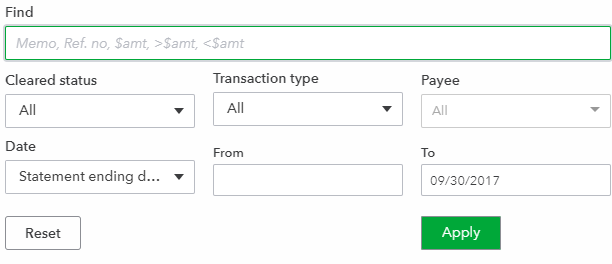
As well, one can now sort the reconcile columns by amount, Ref no, Payee, et…And we can filter by way more information to further find transactions within the Reconcile window.
Reconcile – In Line Edits: Woody Adams and I have teamed up to bring you the QBO TOP 40 COUNTDOWN (to #QBConnect)
We’ve compiled a list of 40 features, tips and tricks that will help you work better, faster smarter. Keep in mind, there’s no particular order here we both just added to the list until we hit 40!
Reconcile: In-line edits
I can add a Payee, change the amount and change the cleared status to reconcile all without having to go to the register…