Receive Partial Purchase Orders. Woody Adams and I have teamed up to bring you the QBO TOP 40 COUNTDOWN (to #QBConnect)
We’ve compiled a list of 40 features, tips and tricks that will help you work better, faster smarter. Keep in mind, there’s no particular order here we both just added to the list until we hit 40!
Progress Invoicing work around. Woody Adams and I have teamed up to bring you the QBO TOP 40 COUNTDOWN (to #QBConnect)
We’ve compiled a list of 40 features, tips and tricks that will help you work better, faster smarter. Keep in mind, there’s no particular order here we both just added to the list until we hit 40!
I would change the reference number of Estimate #2120 to #2120.01 to indicate that it was the first of the estimates used for the project (alternatively, you could just add another Estimate #2120, duplicating the reference numbers, and use the internal memo field to indicate 1, 2, 3, etc). Add the description of the total project in the description of the Estimate so the customer can see the details. Now, duplicate the estimate by clicking the COPY button at the bottom of the screen. Now, edit the line items of the new Estimate to show the remainder of the project, with the details in the description area of a line that has no item in it, just as you did in the original one. Now number this one 2120.02. Should you need more than 2 invoices, keep repeating the process and numbering accordingly. (Keep in mind, you’ll need to adjust the next new Estimate to the next actual number in the sequence – in this case, it should be 2121, but QBO will default to 2120.03).
QuickBooks Labs – SmartScan. Woody Adams and I have teamed up to bring you the QBO TOP 40 COUNTDOWN (to #QBConnect)
We’ve compiled a list of 40 features, tips and tricks that will help you work better, faster smarter. Keep in mind, there’s no particular order here we both just added to the list until we hit 40!
QuickBooks Labs – SmartScan
Cool QB lab beta feature you can turn on in QB labs under Gear icon. Does a QBO file health check across a few different common mistakes, and Intuit is currently seekIng feedback on what other data accountants wouLd like surfaced up as potential issues…
QuickBooks Labs – Projects. Woody Adams and I have teamed up to bring you the QBO TOP 40 COUNTDOWN (to #QBConnect)
We’ve compiled a list of 40 features, tips and tricks that will help you work better, faster smarter. Keep in mind, there’s no particular order here we both just added to the list until we hit 40!
QuickBooks Labs – Projects
Turn Project tracking on in QB Labs, will find that under Gear icon. While it is not yet full on job costing, it does provide a central place to track all your projects, auto-fills the customer:project in Name field on cost forms, and pre-filters the P&L for the particular project to track project profitability. I can also keep up on unbilled time & expense as well as non-billable time. Plus only beta feature (at this time)…
QuickBooks Online Accountant Apps Tab. Woody Adams and I have teamed up to bring you the QBO TOP 40 COUNTDOWN (to #QBConnect)
We’ve compiled a list of 40 features, tips and tricks that will help you work better, faster smarter. Keep in mind, there’s no particular order here we both just added to the list until we hit 40!
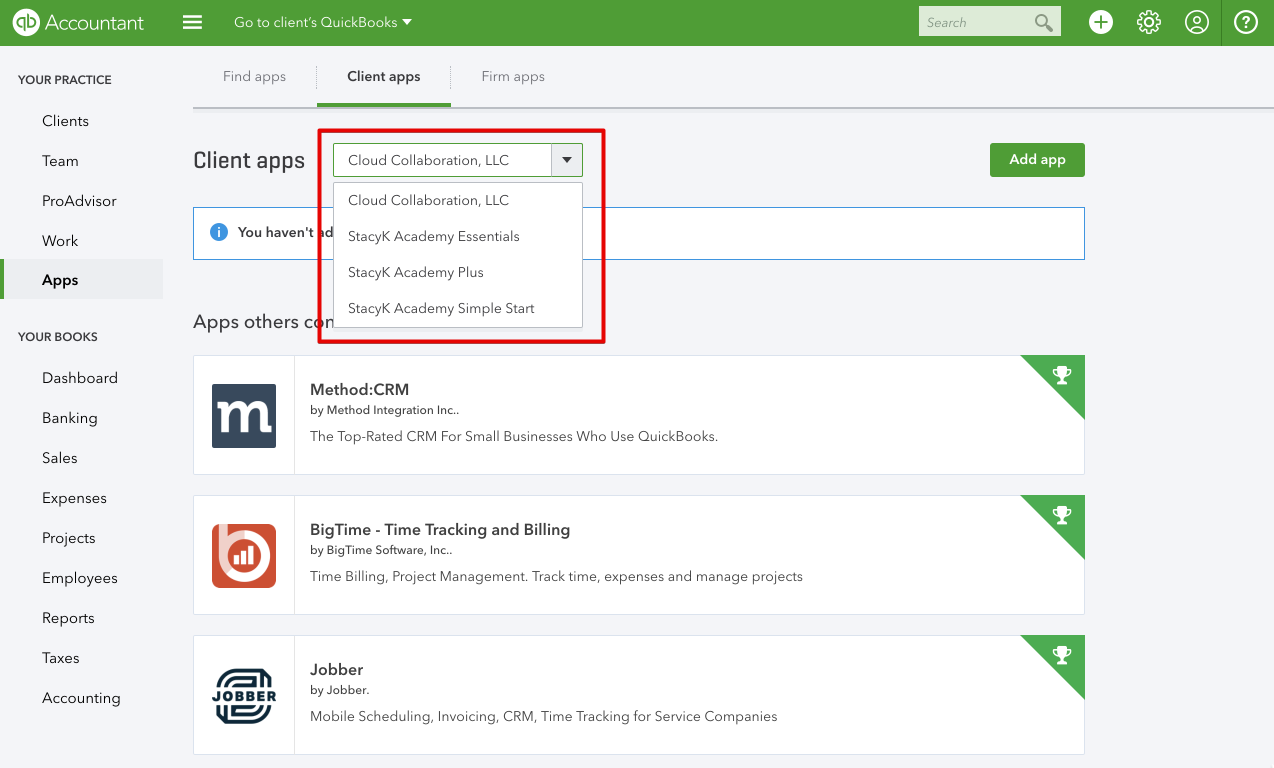
“Historically, I’ve used the Intuit® App Center to search for an app that will fill the need a client might have, and that won’t change because it’s just a personal preference in how I search,” said ProAdvisor Stacy Kildal, owner of Kildal Services. “What will change is the way I manage these apps. In the past, we had to have the clients sign up and then add my firm as a user. With the new QBOA Apps tab, it’s MUCH easier for us to add apps to a client’s QuickBooks Online (QBO) account, view the connected apps and launch.”
Woody and I also talked about this on QBOShow.com, you can listen here.
App Ecosystem. Woody Adams and I have teamed up to bring you the QBO TOP 40 COUNTDOWN (to #QBConnect)
We’ve compiled a list of 40 features, tips and tricks that will help you work better, faster smarter. Keep in mind, there’s no particular order here we both just added to the list until we hit 40!
App Ecosystem
Really need functionality that QBO does not yet support yet need to be mobile? This is where apps.com come into play. Firms can even connect apps for their clients now, or the client can do it themselves. Hundreds of apps have been vetted by Intuit to work well with QBO, which expands the feature set of the online product.