I don’t mean in general, like “turn off your phone and disconnect” or “get back to nature”. I mean, really, who actually does that? Not me. I even have a little waterproof case so I can take my phone to the pool, or the beach.
Disconnect your cancelled apps from QuickBooks Online
That is what I’m talking about.
Yes!
You need to remember to disconnect any add-ons you’ve signed up for via apps.com – then cancelled, for whatever reason.
Why do I need to this, you ask?
Just because you’ve cancelled the account with the app… doesn’t mean they can’t (or won’t) read all of your data in QuickBooks Online.
No. You. Didn’t.
I’m the last person to really make a big deal about this sort of stuff. I’m definitely concerned about security and privacy, but I’m not losing sleep over the fact that Google probably knows intimate details about me than my husband.
I just think it’s one of those best practices that rarely gets mentioned, because many of us think it’s just something everyone would know to do – and I realized as I was leaving the ASBDC conference last week, that I’ve NEVER TALKED ABOUT IT IN ANY APP SESSION I’VE PRESENTED.
For this, I apologize to all of you that are reading this and have been in any of these sessions.
Don’t get me wrong – I have no idea if this has happened. I have no proof of any apps that have done, or continue to do this.
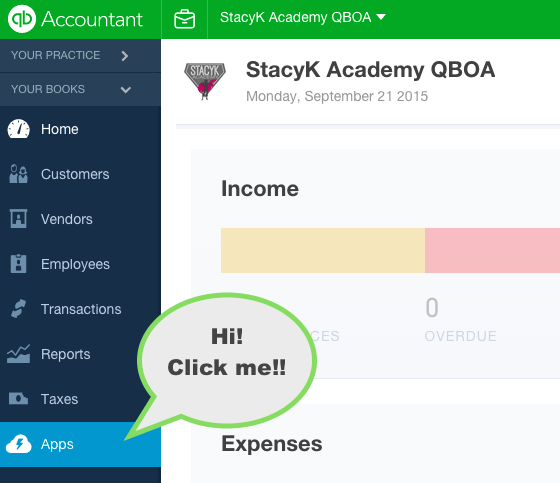
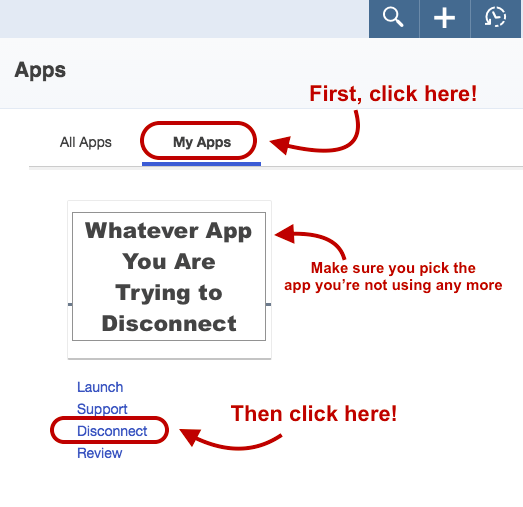
What I do know is that unless you login in to QBO, and then head over to your left nav bar…
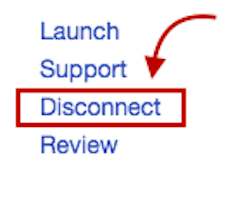
…Then go to “My Apps”, find the app you’ve cancelled, and click “Disconnect”:
If you don’t do disconnect… Any apps that you connected, but have otherwise cancelled directly via their website, will still have access to read your data.
So yeah, always remember to disconnect your cancelled apps from QuickBooks Online, okay peeps?
A strategic alliance – which needs to be nothing more than an agreement to share referrals back and forth – is an important aspect of owning a business, and I think this is especially important for those in the accounting industry. They can help you grow your client base, help you to develop new service offerings, and expose you to new products to help not just your clients, but your own firm as well.
For instance, I have select few local CPAs to which I refer clients; whom I send the client to depends on their needs. I also have relationships with some QuickBooks add-on developers that know I have extensive experience with their applications that refer work to me, and that I regularly recommend to clients and other accounting professionals.
However, a few thoughts about forming these relationships before jumping into them:
Make sure the “partner” has been vetted. You don’t want to recommend a product or service provider with which you’re not familiar enough to speak about in detail, or that you cannot 100% get behind. A good rule of thumb is to ask: Would I hire this person for my own business? Would I pay for this product to use in my practice?
The relationship doesn’t always have to be within your industry. Believe it or not, one of my biggest referrers is a plumbing company that I worked for prior to starting my practice. We are both aware of each other’s level of quality and regularly refer clients back and forth.
Don’t overlook other practitioners that do what you do. While you many think: “That ProAdvisor 6 miles away is competition”, that might not be necessary. I have a handful of what look like on the outside to be competition, but they have different specialties than we do at Kildal Services LLC.
When deciding on creating a new alliance, you want to make sure the prospect in line with your company’s core values, that they offer similar, but not identical products and/or services – the key word here is complementary. As with any new venture, determine what your goals are, plan it out and dig right in once you find that perfect match!
Change is good. I’ve always looked forward to new experiences. As a rule, I embrace change.
This year has been one of change for Kildal Services LLC. We instituted our Base Plus billing, rather than continuing to try to make standard packages work. We began using a standard format for all client email communication.
We also began offering the QuickReview. I love the QuickReview, and I think the clients do too.
What is it? Let’s back up to the beginning of the relationship.
When the client first contacts us, and we start our initial conversations, via email and phone calls, about what their issues are and what they’re looking for us to do – this is is the flirting, if you will – the getting to know each other a little bit.
When clients contact us, many times they’re aware that their books are not right. They’re usually not sure exactly why, but they do know that they’re not able to get the information they need and/or want from the software they’re using, so we take the time to find out what they need and explain how we can help. We ask what they do, how they do it, and who does it. Once we have a good grasp of that, we move to the next step.
This is the QuickReview. It’s sort of the first date with the client. We know what they’re interested in, we know they’re interested in what we have to offer.
With a QuickReview, we ask for a small, prepaid fee to do a high level review of their accounting data. Usually a 24 hour turn around once we have payment and access to the data, we then tell provide them with a list of what needs to be completed to it up, or correct setup. We offer an estimate for the cost to do it, and then let them know that we will apply the QuickReview fee towards these services.
Most of the time, the clients hire us to do the clean up, but sometimes they take our list and do the work themselves. Either way, it’s a win-win for everyone. We’ve been paid for the work we’ve put into looking at the client’s information, and they feel they are getting a fair price by having us apply that fee towards any clean up work we’ll be doing in the futures – which would be billing for anyway. Also, it serves as a way to weed out clients that may not value our time, experience and expertise as much as others. We find that the ones that decline the QuickReview seem to be confirm our initial gut instinct: they want us to tell them what’s wrong and how to fix it for free.
I’m glad we’re changing, and so far, it seems like our clients do as well.
I use Intuit Online Payroll for Accountants to process payroll for my clients and my own practice and this quarter, my Michigan Unemployment was calculated as $189.00. However, when I processed the return and payment on the state’s website (you can’t pay unemployment via e-pay with Michigan, but we’ll set that aside for right now), the amount owed was actually $190.35, and was automatically pulled from my business checking account.
When the downloaded transaction came in to QuickBooks Online, I was planning on just deleting the original one exported from Intuit Online Payroll for Accountants, and adding the one downloaded, but then I did THIS:
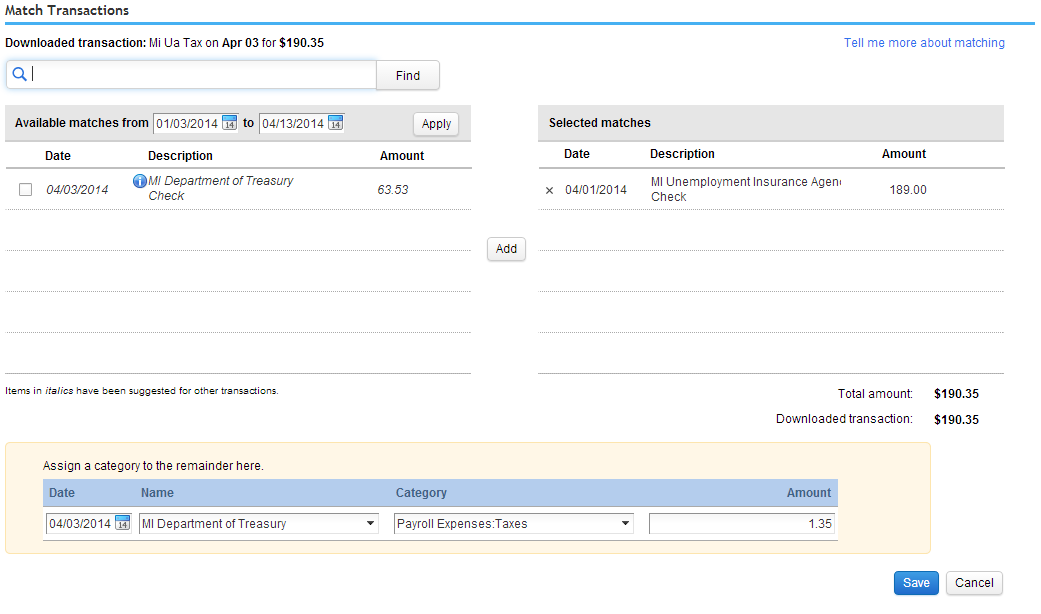
I clicked on the $190.32 that showed in my bank feed, which looked like this:
Then I hit MATCH, right, and I looked for the $189.00 transaction that Intuit Online Payroll for Accountants had exported into my QuickBooks Online, and added it… and it gave me the option to ASSIGN THE REMAINDER!!! So all I had to do was add the payee and the payroll expense account and voila!!!!
I never knew this was something that could be done. LOVE IT!!!!
I left my house last Friday to catch a 545p flight; stopped in LA and then flew the 15 hours straight to Sydney, for 2 weeks of hands on training with Australian bookkeepers and accountants. Three days in Sydney, one in Adelaide and three more in Melbourne.
I’ve been documenting the trip here
Lots of pictures, videos, interviews and articles about the entire experience.
I”m still trying to wrap my brain around the fact that I had kangaroo for dinner the other night…